

Recently I’ve been reading a bunch of papers on finding linear directions within activation space of language models. This line of research is based on the linear representation hypothesis. Under the linear representation hypothesis, high-level concepts like “truth”, “humor”, “Golden-Gate Bridge”, and “code vulnerability” live in one-dimensional subspaces (aka “directions” or vectors) of the transformer residual stream. Once you have found the direction vector of the concept you care about, you can do neat things like remove or enhance that concept in the model’s representations.
One of the more interesting examples relevant to AI alignment is the “refusal” direction. Most models are post-trained to refuse harmful behaviors and the elicitation of unsafe information. Finding the refusal direction vector and removing it from the residual stream allows us to bypass the model’s refusal mechanism, giving us full access to the underlying model’s capabilities and information (i.e. a jailbreak).
One problem that I faced when reading through the above papers was having an ergonomic way of reproducing the experiments and running new experiments of my own, so I made a library for running end-to-end experiments for linear probes. You can download the library with
pip install probelab-pyThrough the rest of this write-up, I will provide a tour of probelab in the context of bypassing refusal on open-weight models. The code is available on my github. There is a refusal-specific notebook available here you can use to follow along below.
probelab flow
concept
The first step when finding linear probes is to figure out what concept you care about. Probelab doesn’t really provide any help with this. It is up to you and your research taste.
dataset
The next step is to create or find a dataset which has contrastive pairs of the concept of interest. Probelab ships with copies of canonical datasets for true/false statements (for finding Truth) as well as harmful/harmless commands (for finding Refusal). If you want a different concept, you can create your own using your LLM of choice (although for certain datasets of specific harmful behaviors, you may need to bypass refusal first in order to get LLM to generate the dataset of interest).
probelab provides a ProbeDataset class for working with different datasets. It provides a common wrapper around the different underlying datasets, which are loaded through specific instantiations of the DatasetLoader class. These implementations handle the specifics of each, allowing them to be mapped to a ProbeDataset. For example, some datasets contain statements, whereas others contain commands. If you want to find probes based on commands (like for refusal), you can pass an instructionify utility function to the DatasetLoader which transforms statements to commands. Here is the function used to build the refusal dataset. You can notice there are several different underlying datasets used (same as from Arditi):
def build_splits():
    print("[refusal] loading datasets...", flush=True)

    harmbench = HarmBenchLoader(subset="standard").load()
    advbench  = AdvBenchLoader().load()
    tdc       = TDC2023Loader().load()
    malicious = MaliciousInstructLoader().load()
    alpaca    = AlpacaLoader().load()

    ds = harmbench.join(advbench).join(tdc).join(malicious).join(alpaca)
    ds = ds.balance(seed=SEED)

    trn_ds, rest = ds.split(left_ratio=0.8, seed=SEED)
    dev_ds, tst_ds = rest.split(left_ratio=0.5, seed=SEED)

    # Harmful-only held-out validation set for causal ablation (mirrors
    # Arditi: ablate the refusal direction during generation on harmful
    # prompts, judge whether refusal rate drops).
    harmful_val_ds = dev_ds.positives()

    return trn_ds, dev_ds, tst_ds, harmful_val_ds
model
Once the dataset has been loaded, next you need to load a model. probelab supports huggingface (both text and multi-modal) as well as transformer_lens based models. tranformer_lens supports more fine-grained hook points for collecting activations and making interventions, however huggingface supports more models, so you’ll have to pick which one works for you.
formatter (optional)
Depending on the concept you are looking for, you may need to transform each example from the ProbeDataset into a specifically-formatted sequence of input tokens. The most common use-cases are implemented in the formatting classes in prompt.py. This is where you can apply a transform to each example to e.g. turn it into a properly formatted chat sequence for the given model. These classes take a tokenizer instance so the correct delimiter and turn-opener token subsequences are applied.
activation spec
Next is the ActivationSpec. This allows you to flexibly specify the per-layer activations and the list of layers to collect from. The transformer_lens backend supports more per-layer locations for collections than the huggingface one does.
collection
The next step is to run the forward pass on the examples. This results in an ActivationDataset, which contains the activation values based on the given ActivationSpec. This is usually done with both a train set and a dev set and gives the raw activation values.
layer sweep
This is where the actual probes are constructed. probelab provides an extendable interface for constructing different types of probes, like difference-of-means or logistic regression, as well as the specific token activations to use. This is done using TokenSelectors and TokenReducers. For example, you can use the PostInstructionTokenSelector to include all the tokens that follow the user command in a chat prompt leading up to the model’s response. The MeanReducer allows you to take the average over the selected tokens. The full list of token classes is in token.py. Other reducers and selectors can be added as needed.
After the probes are calculated, they need to be validated against some metric. The default is classification accuracy of the residual stream activations. However classification accuracy isn’t necessarily indicative of downstream causal importance, so there is also validation via intervention impact on a user-provided metric. The interventions can add or ablate the direction to measure the impact on the metric of interest (e.g. refusal rate).
judges
To assist with measuring the intervention impact, there is another ABC called SemanticJudge. Implementations of this class can provide a yes/no judgement of whether or not the model exhibits the concept of interest. You can bring your own local LLM for this, or use one behind an API like Claude (see claude.py for an example of using Claude as a refusal judge).
visualization
After the experiments are finished, you can visualize the results using the utilities in viz.py. Below are some examples from truth and refusal experiments:
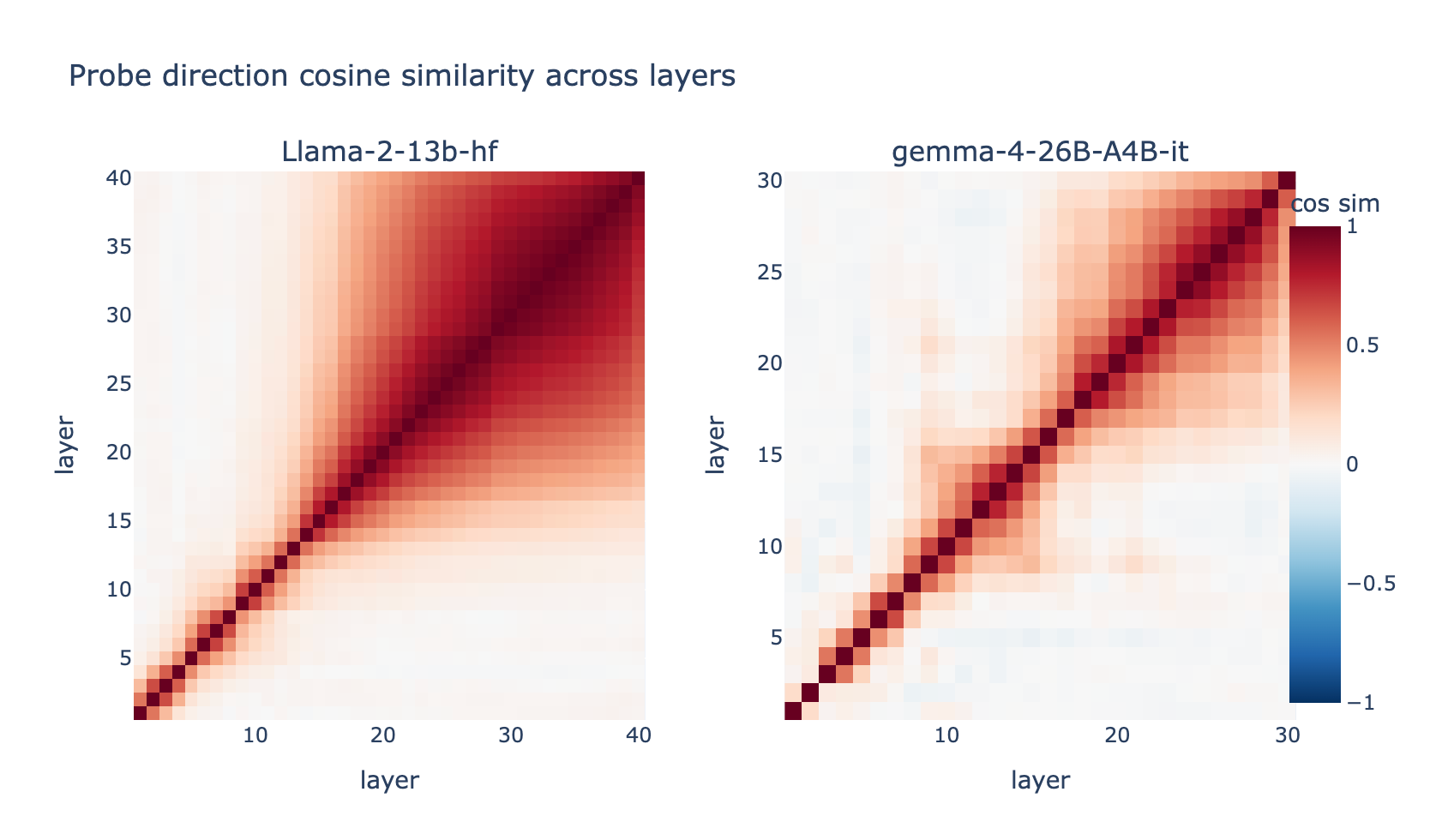
The above is from a reproduction of the Geometry of Truth, which suggests that in Gemma 4, there are two-ish distinct truth directions, one that emerges in layers 10 through 16, and another that emerges later starting around layer 17, as opposed to just one in Llama 2.
Here are the refusal curves for Gemma 4 across three different token selectors:
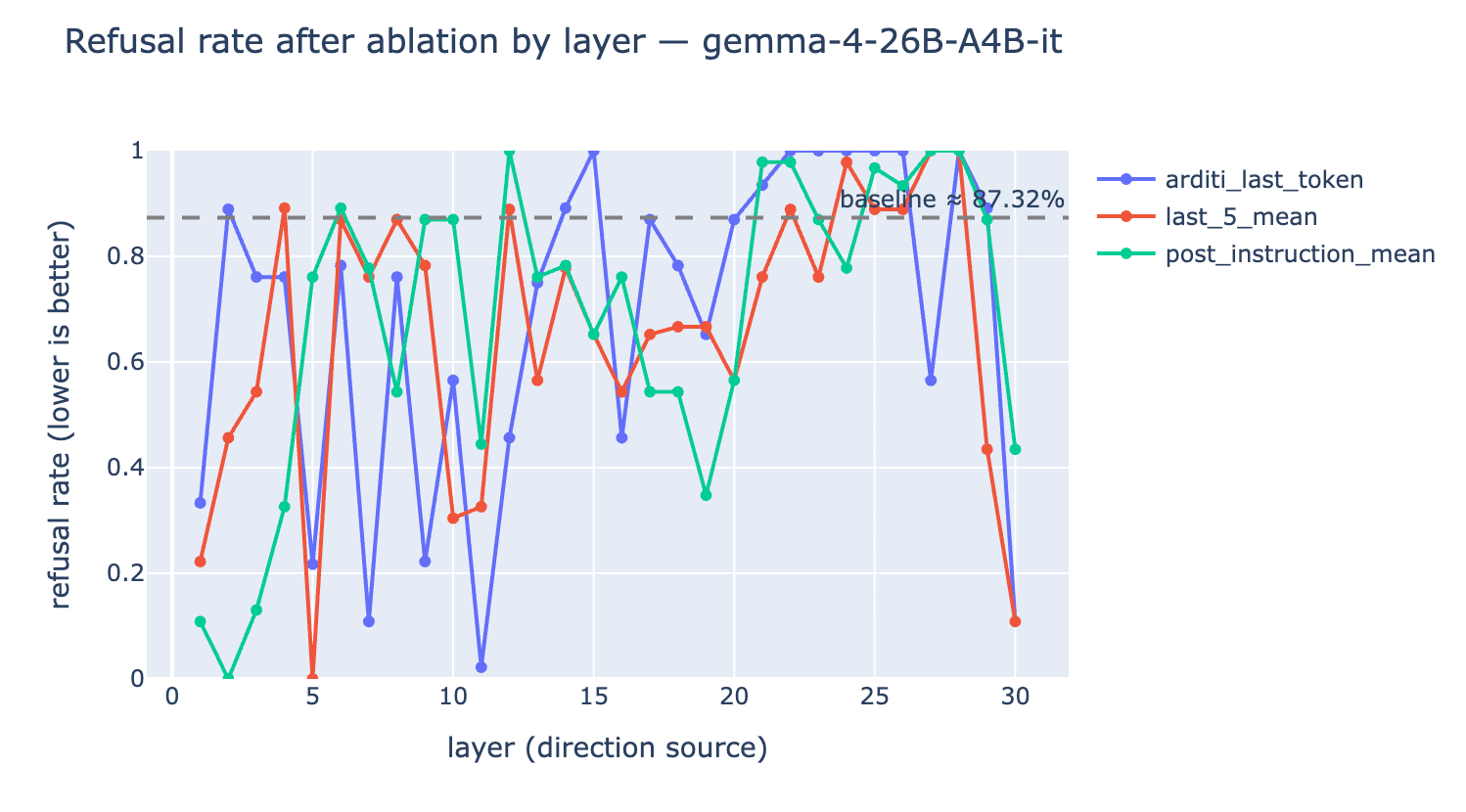
You can see each selector gives a slightly different layer which is the most effective intervention. Here are the refusal curves across three different models, taking the probe as the mean of the last 5 tokens:
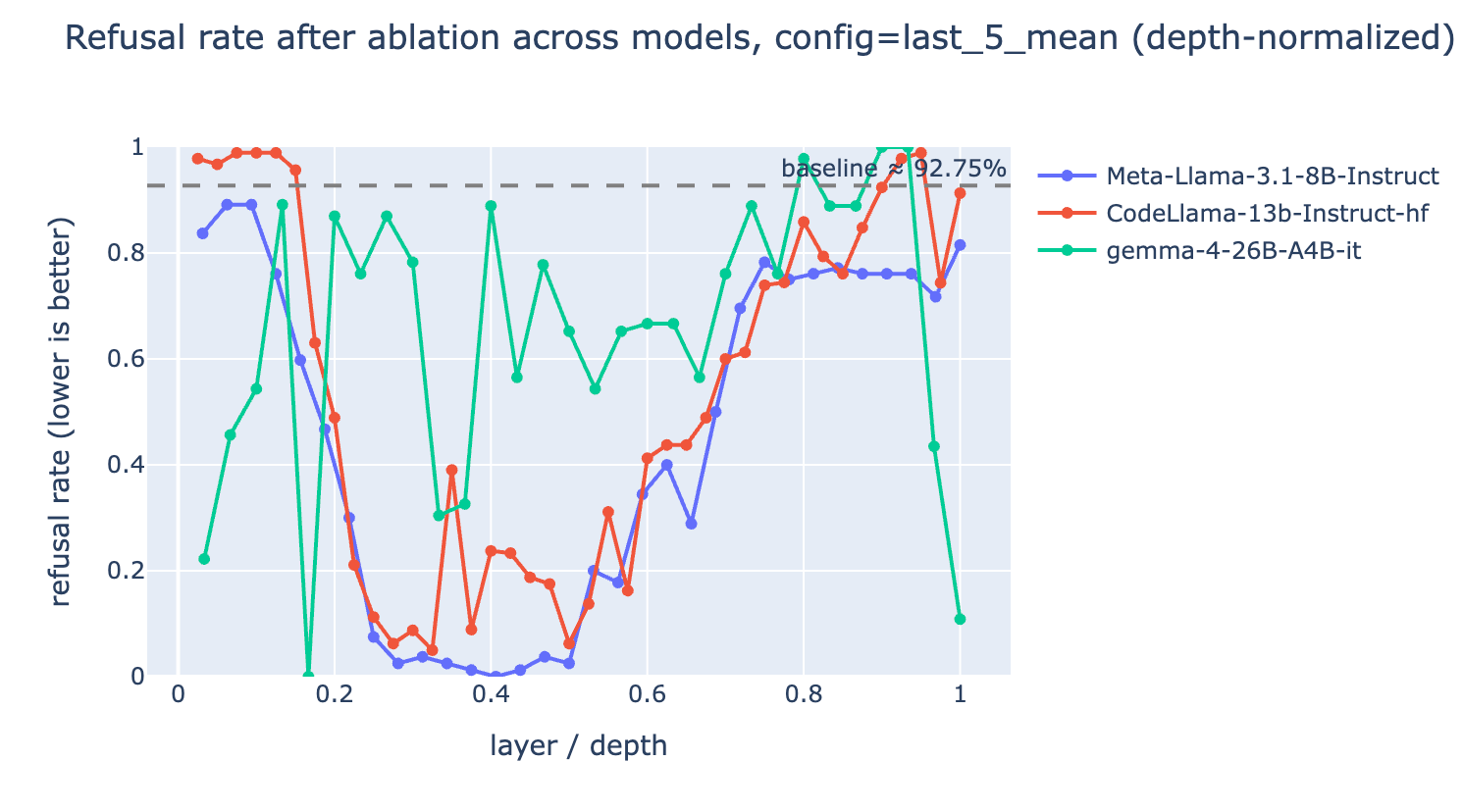
It is interesting that Gemma 4 refusal seems to be much more volatile than the Llama based models. If you have any insight as to why this would be let me know!
Hopefully now you have a good idea of what probelab can do for you. Let me know if you have any suggestions or feature requests. And feel free to submit a PR to the github repo.